
Hands-on Painting Experience in Kyoto Customize a Fox Mask Daruma or Wind Chime
ハイライト
概要
京都
毎日
送迎なし
おすすめポイント
プラン
プラン
Fox Mask Painting Experience
合計:
大人子供共通1人あたり:
Daruma painting experience
合計:
大人子供共通1人あたり:
Wind Chime Painting Experience
合計:
大人子供共通1人あたり:
Fox Mask Painting Experience
概要
スケジュール
Meet at the Akaneya Kyoto Tower Sand Shop
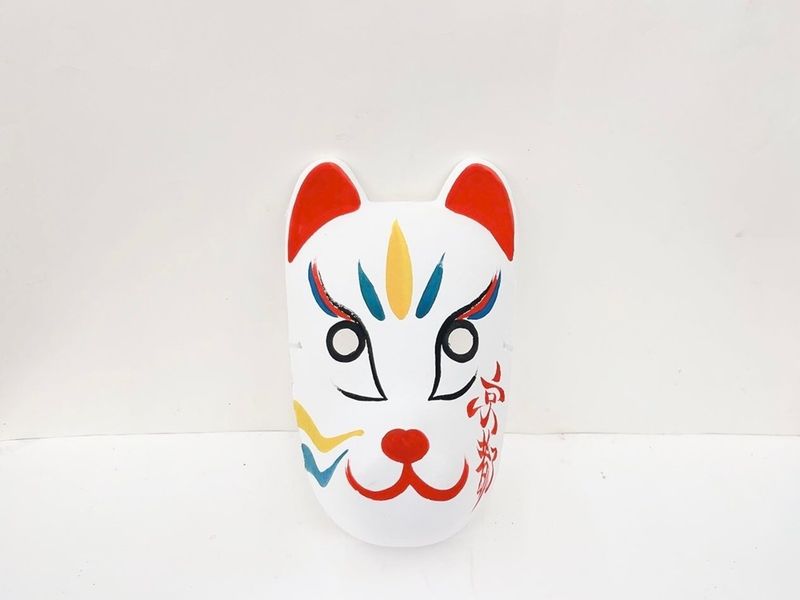
Think about the patterns you want to paint on the fox mask finished with traditional Kyoto washi paper. You can go for a traditional red and black simple design or create your own colorful original design!
Use eight different colors of face paint. Mix them on the palette to create custom shades.
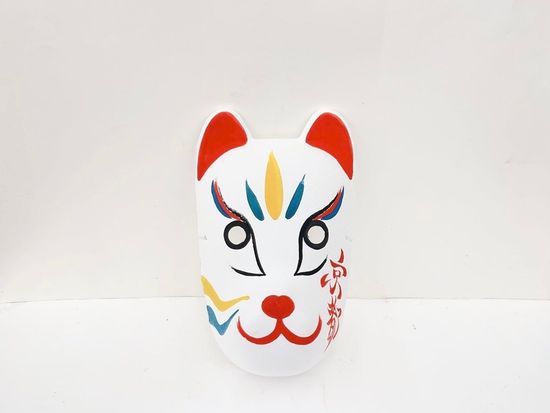
Your mask is ready to take home! Capture photos of your finished masterpiece as a memorable Kyoto keepsake.
Activity Ends
参加場所
集合場所
解散場所

予約前の確認事項
予約前の確認事項
参加制限
- Please make sure to provide your phone number and email address for confirmation and communication purposes.
- It is preferable that you can speak Japanese or English, or that you are accompanied by an interpreter.
その他
- こちらのアクティビティは予約変更を承ることができません。
- 【Voucher Validity】
Valid only for the participation date specified
服装・持ち物
- When using the voucher, open the usage screen from the link sent to you at the time of purchase, press the “Use” button, and show the screen to a staff member.
- *Please ensure you have a stable network connection, as you will need to access the web page on your smartphone.
*Screenshots and printed copies cannot be accepted.
*If you purchase multiple tickets in one transaction, they cannot be used separately, and all tickets will be activated simultaneously. To use the tickets individually, please purchase them separately. - *For security purposes, you may be required to authenticate using a one-time password (OTP). If prompted, please follow the steps below:
- 1. Enter the email address to receive the OTP and press the send button.
2. Check that the OTP has been received by the email address set up in step 1. (The email containing the OTP will be sent from the domain “@linktivity.co.jp.” Please also check your spam folder just to be sure. If you can’t find it there, your email address may be incorrect. Open the URL for the usage screen from the voucher again and try again by entering your email address.) - 3. Enter the OTP listed in the received email into the ticket screen and press the Confirm button. If you enter it correctly, the usage screen will be displayed. (Once OTP authentication is complete, the OTP will be sent to the email address you set. This email address cannot be changed, so please set an email address that can be confirmed locally on the day of use.)
Daruma painting experience
概要
スケジュール
Akaneya Kyoto Tower Sand Shop
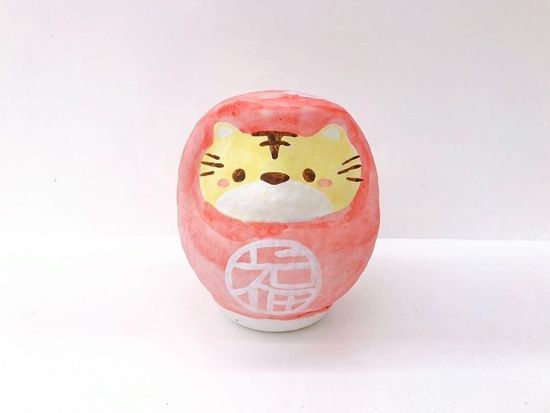
Think about the patterns you want to paint on the daruma finished with washi paper. You can choose a traditional red and black simple design or create your own colorful original design!
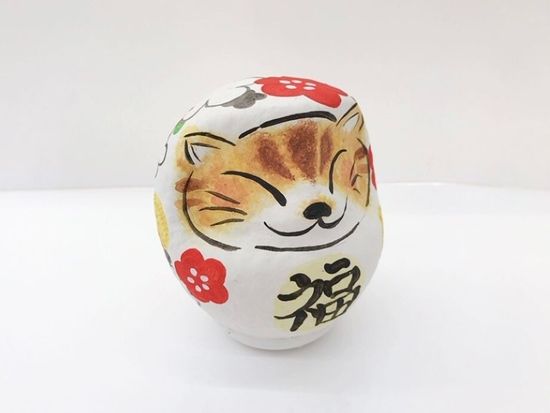
Use eight different colors of face paint and mix them on the palette for custom shades.
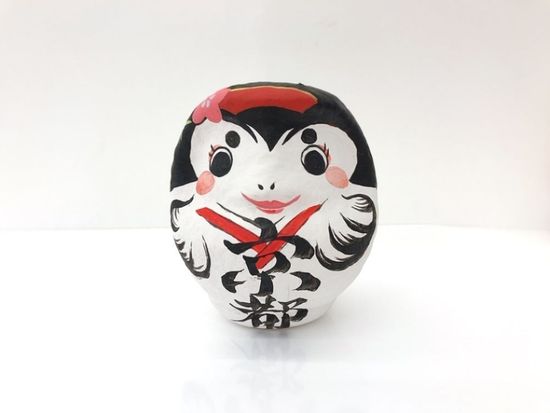
Your Daruma is ready to take home! Capture photos of your creation to remember your Kyoto experience.
Activity Ends
参加場所
集合場所
解散場所
予約前の確認事項
予約前の確認事項
参加制限
- Please make sure to provide your phone number and email address for confirmation and communication purposes.
- It is preferable that you can speak Japanese or English, or that you are accompanied by an interpreter.
その他
- こちらのアクティビティは予約変更を承ることができません。
- 【Voucher Validity】
Valid only for the participation date specified
服装・持ち物
- When using the voucher, open the usage screen from the link sent to you at the time of purchase, press the “Use” button, and show the screen to a staff member.
- *Please ensure you have a stable network connection, as you will need to access the web page on your smartphone.
*Screenshots and printed copies cannot be accepted.
*If you purchase multiple tickets in one transaction, they cannot be used separately, and all tickets will be activated simultaneously. To use the tickets individually, please purchase them separately. - *For security purposes, you may be required to authenticate using a one-time password (OTP). If prompted, please follow the steps below:
- 1. Enter the email address to receive the OTP and press the send button.
2. Check that the OTP has been received by the email address set up in step 1. (The email containing the OTP will be sent from the domain “@linktivity.co.jp.” Please also check your spam folder just to be sure. If you can’t find it there, your email address may be incorrect. Open the URL for the usage screen from the voucher again and try again by entering your email address.) - 3. Enter the OTP listed in the received email into the ticket screen and press the Confirm button. If you enter it correctly, the usage screen will be displayed. (Once OTP authentication is complete, the OTP will be sent to the email address you set. This email address cannot be changed, so please set an email address that can be confirmed locally on the day of use.)
Wind Chime Painting Experience
概要
スケジュール
Meet at the Akaneya Kyoto Tower Sand Shop
Think about the patterns you want to paint on the glass wind chime. You can choose a traditional red and black simple design or create your own colorful original design!
Use eight different colors of face paint. Mix them on the palette to create custom shades.
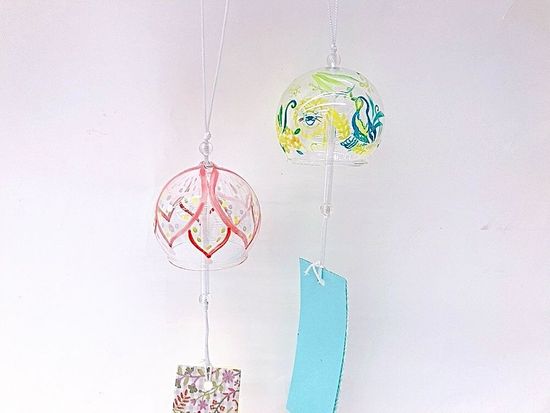
Your wind chime is ready to take home! Capture photos of your artwork and enjoy the gentle sound of your handmade wind chime.
Activity Ends
参加場所
集合場所
解散場所
予約前の確認事項
予約前の確認事項
参加制限
- Please make sure to provide your phone number and email address for confirmation and communication purposes.
- It is preferable that you can speak Japanese or English, or that you are accompanied by an interpreter.
その他
- こちらのアクティビティは予約変更を承ることができません。
- 【Voucher Validity】
Valid only for the participation date specified
服装・持ち物
- When using the voucher, open the usage screen from the link sent to you at the time of purchase, press the “Use” button, and show the screen to a staff member.
- *Please ensure you have a stable network connection, as you will need to access the web page on your smartphone.
*Screenshots and printed copies cannot be accepted.
*If you purchase multiple tickets in one transaction, they cannot be used separately, and all tickets will be activated simultaneously. To use the tickets individually, please purchase them separately. - *For security purposes, you may be required to authenticate using a one-time password (OTP). If prompted, please follow the steps below:
- 1. Enter the email address to receive the OTP and press the send button.
2. Check that the OTP has been received by the email address set up in step 1. (The email containing the OTP will be sent from the domain “@linktivity.co.jp.” Please also check your spam folder just to be sure. If you can’t find it there, your email address may be incorrect. Open the URL for the usage screen from the voucher again and try again by entering your email address.) - 3. Enter the OTP listed in the received email into the ticket screen and press the Confirm button. If you enter it correctly, the usage screen will be displayed. (Once OTP authentication is complete, the OTP will be sent to the email address you set. This email address cannot be changed, so please set an email address that can be confirmed locally on the day of use.)
体験談
催行会社 LINKTIVITY Inc.2
催行会社
よくある質問
ご不明な点がございましたらサポートサイト内の「お問い合わせ」よりご連絡ください。
お支払い・ キャンセル

キャンセル料
- 参加日の30営業日前の現地時間00:00から7営業日前の現地時間00:00まで、予約総額の40%
- 参加日の7営業日前の現地時間00:00から1営業日前の現地時間00:00まで、予約総額の50%
- 参加日の1営業日前の現地時間00:00以降、予約総額の100%
営業日
- 年中無休
お支払い・ キャンセル
支払方法
- クレジットカード
![]()
- コンビニ、銀行ATM
- *予約によってはご利用いただけない場合があります。詳しくはこちら
キャンセル料
- 参加日の30営業日前の現地時間00:00から7営業日前の現地時間00:00まで、予約総額の40%
- 参加日の7営業日前の現地時間00:00から1営業日前の現地時間00:00まで、予約総額の50%
- 参加日の1営業日前の現地時間00:00以降、予約総額の100%
クレジットカード決済通貨:円
- 予約受付時の為替レートにより日本円に換算されます。
京都人気ランキング



















- Please make sure to provide your phone number and email address for confirmation and communication purposes.
- It is preferable that you can speak Japanese or English, or that you are accompanied by an interpreter.
- When using the voucher, open the usage screen from the link sent to you at the time of purchase, press the “Use” button, and show the screen to a staff member.
- *Please ensure you have a stable network connection, as you will need to access the web page on your smartphone.
*Screenshots and printed copies cannot be accepted.
*If you purchase multiple tickets in one transaction, they cannot be used separately, and all tickets will be activated simultaneously. To use the tickets individually, please purchase them separately. - *For security purposes, you may be required to authenticate using a one-time password (OTP). If prompted, please follow the steps below:
- 1. Enter the email address to receive the OTP and press the send button.
2. Check that the OTP has been received by the email address set up in step 1. (The email containing the OTP will be sent from the domain “@linktivity.co.jp.” Please also check your spam folder just to be sure. If you can’t find it there, your email address may be incorrect. Open the URL for the usage screen from the voucher again and try again by entering your email address.) - 3. Enter the OTP listed in the received email into the ticket screen and press the Confirm button. If you enter it correctly, the usage screen will be displayed. (Once OTP authentication is complete, the OTP will be sent to the email address you set. This email address cannot be changed, so please set an email address that can be confirmed locally on the day of use.)
- こちらのアクティビティは予約変更を承ることができません。
- 【Voucher Validity】
Valid only for the participation date specified
- Please make sure to provide your phone number and email address for confirmation and communication purposes.
- It is preferable that you can speak Japanese or English, or that you are accompanied by an interpreter.
- When using the voucher, open the usage screen from the link sent to you at the time of purchase, press the “Use” button, and show the screen to a staff member.
- *Please ensure you have a stable network connection, as you will need to access the web page on your smartphone.
*Screenshots and printed copies cannot be accepted.
*If you purchase multiple tickets in one transaction, they cannot be used separately, and all tickets will be activated simultaneously. To use the tickets individually, please purchase them separately. - *For security purposes, you may be required to authenticate using a one-time password (OTP). If prompted, please follow the steps below:
- 1. Enter the email address to receive the OTP and press the send button.
2. Check that the OTP has been received by the email address set up in step 1. (The email containing the OTP will be sent from the domain “@linktivity.co.jp.” Please also check your spam folder just to be sure. If you can’t find it there, your email address may be incorrect. Open the URL for the usage screen from the voucher again and try again by entering your email address.) - 3. Enter the OTP listed in the received email into the ticket screen and press the Confirm button. If you enter it correctly, the usage screen will be displayed. (Once OTP authentication is complete, the OTP will be sent to the email address you set. This email address cannot be changed, so please set an email address that can be confirmed locally on the day of use.)
- こちらのアクティビティは予約変更を承ることができません。
- 【Voucher Validity】
Valid only for the participation date specified
- Please make sure to provide your phone number and email address for confirmation and communication purposes.
- It is preferable that you can speak Japanese or English, or that you are accompanied by an interpreter.
- When using the voucher, open the usage screen from the link sent to you at the time of purchase, press the “Use” button, and show the screen to a staff member.
- *Please ensure you have a stable network connection, as you will need to access the web page on your smartphone.
*Screenshots and printed copies cannot be accepted.
*If you purchase multiple tickets in one transaction, they cannot be used separately, and all tickets will be activated simultaneously. To use the tickets individually, please purchase them separately. - *For security purposes, you may be required to authenticate using a one-time password (OTP). If prompted, please follow the steps below:
- 1. Enter the email address to receive the OTP and press the send button.
2. Check that the OTP has been received by the email address set up in step 1. (The email containing the OTP will be sent from the domain “@linktivity.co.jp.” Please also check your spam folder just to be sure. If you can’t find it there, your email address may be incorrect. Open the URL for the usage screen from the voucher again and try again by entering your email address.) - 3. Enter the OTP listed in the received email into the ticket screen and press the Confirm button. If you enter it correctly, the usage screen will be displayed. (Once OTP authentication is complete, the OTP will be sent to the email address you set. This email address cannot be changed, so please set an email address that can be confirmed locally on the day of use.)
- こちらのアクティビティは予約変更を承ることができません。
- 【Voucher Validity】
Valid only for the participation date specified
-
STEP 1対象商品の中から1品予約
![]()
-
STEP 2予約完了後にクーポンを獲得
![]()
- STEP 3さらに対象商品の中からもう1品予約獲得したクーポンを使って割引価格で購入できます

対象となる参加日:
- ※ご利用はキャンペーン期間中、お一人様1回のみとなります
- ※既にご予約済のアクティビティと同一日時かつ同一商品には使えません